Horse Anatomy: Equine 3D
- 3.0
- Rating
- 10.00K
- Installs
- $6.99
- Price
 Analysis by App-foxy
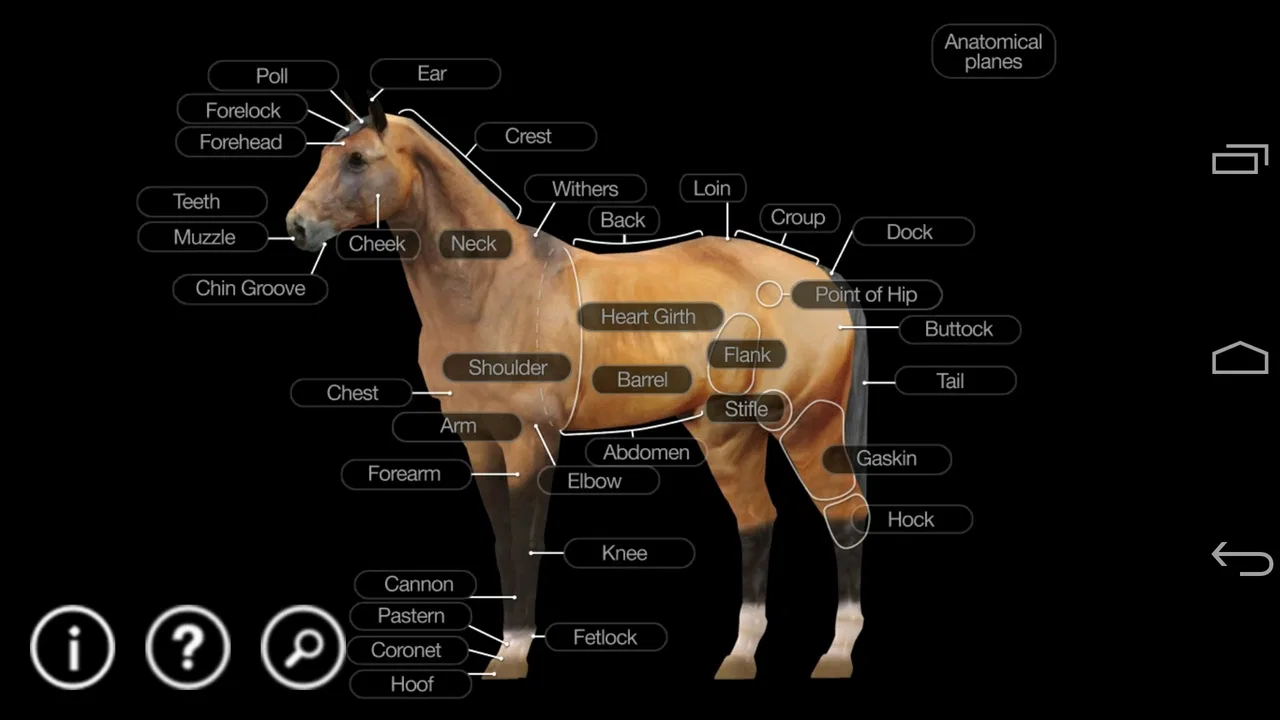
Horse Anatomy: Equine 3D is the kind of medical reference app I would keep nearby when I need to understand a horse’s body spatially rather than through a flat illustration. Developed by Real Bodywork, it presents more than three hundred anatomical structures in a three-dimensional reference and adds a quiz function for checking what I remember. That combination makes it more useful than a simple labeled picture, especially when I am trying to connect a bone, muscle, organ, or body region with the surrounding structures.
I approached it as a learning tool rather than a replacement for a veterinary textbook. That distinction matters. The app is aimed at visual exploration and recall, so its strongest moments come when I rotate the model, isolate a structure, and test myself. It is less suitable when I need a detailed clinical explanation, a diagnosis, treatment guidance, or a complete professional reference. In my experience, it works best as a focused companion for students, horse owners, massage learners, and anyone who needs to build a better mental map of equine anatomy.
Building a dependable anatomy study routine
I build a dependable anatomy routine by choosing a clear question before opening the model, then checking whether I can answer it from more than one angle. Keeping a short list of structures that still feel uncertain gives each return visit a purpose and helps me notice progress without mistaking repeated recognition for lasting recall.
You May Also Like

 Blood Strike: 2.5 Anniversary
Blood Strike’s Loadouts Turn Every Drop Into a Tactical Gamble
A close look at Blood Strike’s custom loadouts: how fast access to signature weapons reshapes its battle royale rhythm, rewards preparation, and narrows the gap between fights.

 Pandora - Music & Podcasts
Pandora’s Music Is Easy to Start, but Harder to Recover
Pandora’s strength is its low-effort path from a seed to a station. Its weak spot is how much confidence it asks you to place in connection, setup, and quiet recovery.

 8 Ball Pool
 Is Built on Rivalries, Rematches, and Routine
A close look at the rivalries, rematches, shared routines, and unanswered safety questions that turn a quick pool match into a persistent mobile community.

 Samsung Music
’s Quiet Strength Is Playing What You Already Own
Its reach comes less from spectacle than from dependable access to a personal library. That simplicity is both the app’s strongest retention engine and its ceiling.

 AccuWeather: Weather Radar
AccuWeather Review: A Quick, Clear Forecast for Everyday Decisions
For everyday plans, the best forecast is the one you can understand quickly. AccuWeather makes rain timing, radar, and local conditions easy to act on, with a few trade-offs.

 Hill Climb Racing
Why Hill Climb Racing Still Turns Crashes Into One More Run
A tiny car, a bumpy hill and one more upgrade: Hill Climb Racing keeps resurfacing because its simple chaos makes every near-miss feel personal.
More From Our News Desk
View All News


Start with one body region instead of exploring randomly
The most effective way I found to use Horse Anatomy: Equine 3D was to begin with a single region and stay there long enough to understand how its parts relate. Jumping from the skull to the hind limb and then to the internal organs can feel entertaining, but it does not create a strong memory. A better session starts with a clear question: where is this structure, what sits beside it, and what changes when I view it from another angle?
The three-dimensional model is valuable because anatomy is not arranged like a page in a book. A structure that seems obvious from the side may be hidden when viewed from the front or rear. I rotate the horse slowly, pause when a label becomes relevant, and then move the model again to see whether I can recognize the same area without relying on one familiar viewpoint. That small habit turns the app from a passive picture into an active spatial exercise.
I also recommend separating recognition from recall. During the first pass, I use the labels to identify what I am looking at. On the second pass, I try to locate the same structure before checking its name. This is particularly useful for learners who can recognize a term when they see it but cannot find the structure independently. The quiz function becomes more meaningful after this preparation because it tests whether the information has stayed with me.
Use the quiz as a checkpoint, not as the entire lesson
The quiz is one of the app’s most practical additions, but I would not begin every session with it. If I miss a question, I want to return to the model and investigate the location rather than simply guess again. The best workflow is to study a small area, take the quiz, record the structures that caused hesitation, and revisit only those areas before ending the session.
This approach also helps reveal a common weakness in anatomy study: knowing vocabulary without understanding position. If I can name a muscle but cannot identify what lies superficial to it or which direction I need to rotate the model to see it, my knowledge is incomplete. The app cannot replace hands-on work or a teacher’s explanation, but its interactive model makes that gap easier to notice.
For an everyday example, imagine preparing for a practical lesson on a horse’s back. Instead of opening the app and browsing every available structure, I would spend a short session tracing the region from the spine outward, checking neighboring structures, and then using the quiz to test recognition. Before the lesson, I would repeat the same route without reading labels. That creates a repeatable routine and keeps the app connected to a real task.
What the app is actually good at
Its main strength is visual orientation. A conventional anatomy book may offer excellent explanations and carefully drawn plates, but I often have to mentally combine several images to understand depth. Here, the ability to manipulate the model gives me a more immediate sense of where structures sit in relation to one another. That is especially helpful for people who learn better by moving through a model than by memorizing a page.
It is also convenient for quick revision. I can use it before a class, while reviewing terminology, or when a conversation about a horse’s body leaves me unsure about location. The content rating is Everyone, which makes the presentation approachable for a broad audience, although younger users would still benefit from adult guidance when interpreting medical terms or applying what they see.
The app has an average rating of 3.0 from 142 ratings, with 25 written reviews, and it has reached 10K+ installs. I would read those figures as a sign that it serves a specific audience rather than as proof that it will suit every learner. Its focused nature is part of the appeal, but it also means that people expecting a broad veterinary education platform may find the experience limited.
Settings and viewing habits worth checking
When I use any interactive anatomy model, I first check how labels, visibility, and movement behave on my device. With this app, the practical goal is not to change every available option but to make the model readable. If labels become crowded, I reduce the number of structures I am trying to study at once. If rotation becomes disorienting, I return to a familiar side view and then make smaller movements.
I find it useful to treat the viewing angle as part of the lesson. For a structure that is easy to identify from the side, I deliberately test myself from the front or rear. This exposes whether I have learned the structure itself or merely memorized its appearance in one orientation. I also avoid spinning the model continuously; slow, deliberate rotation gives me a better sense of depth and makes it easier to compare neighboring parts.
Screen size affects the experience. On a phone, I prefer short sessions focused on a few structures because labels and fine details can feel cramped. A larger display is more comfortable for extended study, but it does not remove the need for a disciplined workflow. The model can still become visually busy if I activate or inspect too many structures at the same time.
The current version is 2.15, and the app supports Android 4.1 or later. That broad compatibility is useful if I am using an older device for study, but the quality of the experience still depends on how comfortably the model can be viewed and manipulated. I would check the device’s responsiveness before planning long revision sessions, particularly if I rely on precise rotation and repeated inspection.
Faster patterns for repeat study
After becoming familiar with the basic controls, I stopped treating each visit as a fresh browsing session. I created a simple rotation: first orientation, neighboring structures, closed-label recall, and quiz. The exact order is less important than repeating the same pattern. Consistency reduces the time spent deciding what to do and leaves more attention for learning.
Another useful pattern is contrast study. I choose two structures that are easy to confuse, inspect them separately, and then compare their positions. Instead of memorizing isolated names, I ask what landmark would help me find each one. This is a more realistic skill for hands-on work because a practitioner often begins with a visible or palpable reference point rather than a perfectly labeled diagram.
I also recommend ending a session with a verbal explanation. After using the model, I describe the route from one recognizable landmark to the target structure in plain language. If I cannot explain that route, I return to the model once more. This habit turns visual memory into something I can communicate, which is useful for students, instructors, and horse owners discussing concerns with professionals.
The quiz can support spaced review if I do not overuse it. I prefer to revisit the same body region after a gap rather than repeat it immediately until every answer feels familiar. Immediate repetition can create confidence without durable recall. The app does not need a complicated study system for this to work; a handwritten list of difficult structures and a regular return to them is enough.
Where it compares well with books and general anatomy apps
Compared with a printed equine anatomy book, Horse Anatomy: Equine 3D is quicker for checking spatial relationships. I do not need to flip between multiple plates to change perspective. That makes it a strong companion when I am trying to understand the depth and arrangement of a region.
A book is usually better for extended reading, terminology explanations, clinical context, and carefully structured lessons. If I need to understand why an injury affects movement, or how a condition is assessed, I would choose a reputable veterinary text or instruction from a qualified professional. The app can help me locate the relevant structures, but it should not be treated as the explanation of a medical problem.
Compared with a broad human anatomy app, this one has the advantage of staying focused on the horse. That focus saves time for equine learners, since I am not filtering through unrelated human anatomy content. The trade-off is scope: a general medical reference may offer more educational material around physiology, pathology, and treatment, while this app concentrates on the anatomical model and quiz experience.
Advanced limits that experienced users should understand
The most important limitation is that a three-dimensional model can create an impression of completeness. Seeing many structures does not automatically provide the clinical detail needed to interpret pain, lameness, swelling, or changes in movement. I would never use the app to diagnose a horse or decide whether professional care is necessary. At most, it can help me ask better questions and understand the words used in a veterinary conversation.
There is also a learning trade-off between detail and clarity. Showing more structures at once may feel comprehensive, but it can make the model harder to read. I get better results by narrowing my attention and rebuilding the layers gradually. This is not a weakness unique to the app; it is a normal challenge with interactive anatomical models. The tool rewards patience more than fast browsing.
The quiz has a similar boundary. It can show whether I recognize a structure in the app’s presentation, but successful answers do not prove that I can identify that structure on a live horse. Real bodies vary in posture, condition, muscle development, and surface landmarks. I treat quiz performance as a checkpoint for study, then connect it with supervised practical learning whenever possible.
Another trade-off is cost. At $6.99, this is a paid reference rather than a casual free download. I think that price makes sense for someone who expects to return to an equine anatomy model repeatedly. It is harder to justify for a curious user who only wants a quick look at horse anatomy once. Before buying, I would decide whether the quiz and interactive model solve a recurring need rather than simply sounding interesting.
Who should use it, and who should choose something else
I would recommend it to equine students, horse massage learners, trainers who want a clearer anatomical vocabulary, and owners who enjoy structured self-study. It is particularly suitable for visual learners who find flat diagrams difficult to interpret. The combination of model exploration and testing gives these users a practical way to turn unfamiliar terms into recognizable locations.
I would be more cautious about recommending it to veterinary professionals seeking a complete reference. It may be useful as a quick visual reminder, but professional work demands authoritative detail, current clinical guidance, and context that a focused anatomy app does not provide. A textbook, course resource, or specialist tool would be a better primary choice.
I would also suggest skipping it if the main goal is diagnosing a horse, planning treatment, or learning through long written explanations. The app is strongest when I want to see and remember where structures are. If reading, clinical case studies, or instructor-led practice is the preferred learning style, another resource will probably deliver more value.
My verdict after making it part of a study routine
Horse Anatomy: Equine 3D succeeds because it addresses a specific problem: understanding equine anatomy in space. Real Bodywork keeps the experience centered on a manipulable reference with a quiz, and that focus makes it easy to build repeatable habits around short study sessions. I appreciate that it can move me from “I have heard this term” to “I can locate this structure and describe its neighbors.”
Its limitations are just as clear. It is not a veterinary education course, not a diagnostic guide, and not a substitute for observing real horses under qualified supervision. The paid price also means casual users should think about how often they will return to it. For serious learners, however, the ability to rotate the model, reduce visual confusion, and test recall can justify keeping it available.
My recommendation is simple: buy it for focused visual revision, not for medical answers. If I were advising a friend, I would suggest choosing one body region, studying it from several angles, testing it with the quiz, and then explaining the relationships aloud. Used that way, this medical reference becomes more than a collection of labels. It becomes a practical bridge between textbook terminology and the three-dimensional body of the horse.
FAQs for Horse Anatomy: Equine 3D
01What is Horse Anatomy: Equine 3D?
Horse Anatomy: Equine 3D is an educational reference app that presents the anatomy of a horse through interactive three-dimensional models. It is designed to help users explore bones, muscles, organs, and other anatomical structures from different angles. The app can be useful for veterinary students, horse owners, riders, trainers, and anyone interested in understanding equine anatomy more clearly.
02Who can benefit from using Horse Anatomy: Equine 3D?
The app is mainly intended for students and professionals studying veterinary medicine, animal science, equine care, or related subjects. However, it can also be helpful for horse owners, riders, trainers, and enthusiasts who want a visual introduction to how a horse’s body is organized. It should be treated as an educational aid rather than a replacement for professional veterinary instruction or medical advice.
03What can I explore inside the 3D horse model?
Horse Anatomy: Equine 3D allows users to examine anatomical parts using an interactive model rather than relying only on flat illustrations. Depending on the selected section, you may be able to rotate the horse, zoom in, hide or display layers, and identify structures such as the skeleton, muscles, organs, and other body systems. These tools make it easier to understand the position and relationship of different parts.
04Is Horse Anatomy: Equine 3D suitable for beginners?
Yes, the visual 3D presentation makes the app approachable for beginners who may find traditional anatomy diagrams difficult to understand. Users can study the model gradually and focus on individual structures instead of viewing the entire body at once. Nevertheless, some labels and terminology may be more familiar to veterinary or biology students, so beginners may benefit from using a textbook or introductory learning materials alongside the app.
05Does the app replace a veterinarian or formal equine anatomy course?
No. Horse Anatomy: Equine 3D is intended for learning and reference purposes, not for diagnosing injuries, planning treatment, or making decisions about a horse’s health. Anatomical information shown in the app cannot replace an examination by a qualified veterinarian. If your horse is showing pain, lameness, swelling, breathing problems, or any other concerning symptom, contact a professional instead of relying solely on the application.
Pros
- Detailed 3D models help visualize bones
- muscles
- and organs clearly.
- Interactive rotation and zoom make studying horse anatomy more engaging.
- Useful reference for veterinary students
- riders
- and equine professionals.
- Organized anatomical layers make complex structures easier to understand.
- Works well as a quick study aid without needing physical textbooks.
Cons
- Some advanced content may require an in-app purchase or subscription.
- Large 3D assets can consume considerable storage space on your device.
- Older phones may experience slower loading or less fluid model movement.
- Medical terminology may be difficult for beginners without prior knowledge.
- The app focuses on anatomy and offers limited practical horse-care guidance.

Horse Anatomy: Equine 3D
Gallery